Meet Your PC’s Built-In Bodyguard: The Windows Security App

Windows Security: Your PC's Personal Bouncer

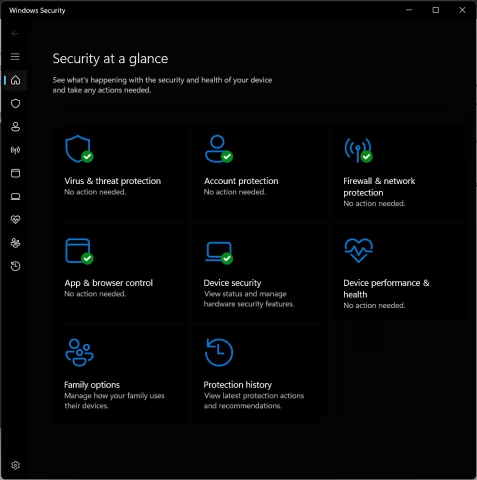
Think of the Windows Security app as the built-in, 24/7 security guard for your Windows 10 or Windows 11 device. Instead of waiting for trouble to knock, it works silently in the background from the second you boot up, keeping digital party-crashers, viruses, and malware firmly outside the velvet rope.
Image
microsoft security dashboard


The Defense Trio

  • Microsoft Defender Antivirus: The active patrol unit, constantly scanning files to catch and neutralize digital bugs before they can cause a headache.
  • Windows Firewall: The digital gatekeeper, keeping a strict eye on the data moving in and out of your network to protect your privacy.
  • Smart App Control: The ultimate vibe check, blocking shady or untrusted applications from running on your machine.

💡 Subscribed to Microsoft 365? If you have a Family or Personal plan, you also get access to the advanced Microsoft Defender app, which extends this cross-platform protection to your Mac, iOS, and Android gear too.


Quick How-Tos: Running the Show


🔍 Spot-Checking a Shady File

If a specific file or folder looks a bit sketchy, you don't have to scan your whole hard drive to check it.

  1. Right-click the suspicious item in File Explorer.
  2. Select Scan with Microsoft Defender. (If you are on Windows 11, click Show more options first to reveal the scanner).


⚡ The "Just in Case" Quick Scan

If your PC is acting a little sluggish or weird, drop a quick health check on your core system files:

  • Open the app and head to Virus & threat protection > Quick scan.
  • The Express Route: Click this link to jump right to it: windowsdefender://quickscan/


🛑 Giving Real-Time Protection a Temporary Break

Occasionally, a trusted program installation or a developer tool might trip the alarm. You can temporarily tell the bouncer to step aside:

  1. Head over to Virus & threat protection > Manage settings (or use the shortcut: windowsdefender://threatsettings/).
  2. Flip the Real-time protection toggle to Off.
     

⚠️ Heads Up: While the guard is off duty, downloaded files won't be screened, leaving your system vulnerable. Don't worry about forgetting to turn it back on, though—Windows will automatically reactivate it after a short period to make sure you stay safe.

Your Dedicated Partner in the Digital World

Internize Web Services provides free analysis and implementations that give the best chance of success for small business owners. We bridge the gap between complex online systems and your day-to-day operations, ensuring your digital presence is powerful, secure, and seamlessly managed.
 

Web Services Information


Web Services


Free Current Online Analysis


How Internize Supports Your Business

The internet evolves at lightning speed, and keeping up can easily become a full-time job. That is exactly why using our services to manage your online presence is essential. Internize takes the technical weight completely off your shoulders so you can channel 100% of your energy into what you do best: running and growing your business.

Here is how Internize Web Services will keep your digital strategy sharp and effective:

  • Future-Proofing Your Presence: We continuously monitor the horizon for new internet technologies and services, guaranteeing our partners are always stationed at the very forefront of digital innovation rather than playing catch-up.
  • Ironclad Security & Best Practices: The safety of your business and your customers is paramount. We meticulously implement modern internet security protocols and ensure your infrastructure strictly complies with the latest industry-recommended best practices.
  • Universal Accessibility: A great business should be open to everyone. Internize Web Services champions digital accessibility, making sure your online platforms are fully usable, compliant, and welcoming to all audiences, removing barriers to entry for your customers.
  • Data-Driven Strategies: Guesswork has no place in business management. We conduct free analyses of your current online operations and provide you with crystal-clear, actionable reports. You'll always know exactly where you stand with comprehensive records of completed services, detailed plans of action, and transparent tracking of all new technology implementations.


Register With Internize for Free

Take advantage of our free membership to unlock our VIP area. Inside it contains expert information explaining how we help small businesses grow and get the very best of the internet and cutting edge tech that you need to get ahead of your competition.


Your VIP status not only provides you with current information about social media automation, it will show you how automated social media posts can increase your business exposure to local people who demand your services. Internize can show you how having an effective plan of action for your Social Media Campaigns, not only increases your businesses Social Media Post Views, but grows your brand and trust of your customers.


Let’s Elevate Your Online Operations

Consider me your personal, on-demand IT department, web manager, and digital strategist all rolled into one. Whether you are looking to overhaul your internet security, implement cutting-edge web services, make your website accessible, or simply need a roadmap to make your online operations more efficient, I am here to do the heavy lifting at the highest standard possible.

I am always more than happy to chat about your unique needs, answer your questions, and explore how we can optimize your digital footprint. Contact me now for friendly and free expert advice. We will provide you with a custom plan of action that's suited to meet your precise current and ongoing needs. Let's build something exceptional together and enjoy a mutually beneficial partnership!